Figabytes makes it easier to understand the current status of your eSIM directly from the My eSIMs section of your account.
Depending on information received from the eSIM provider, your eSIM may appear as:
These statuses help you understand whether your eSIM is currently installed, available to install again, or has been deactivated by the carrier.
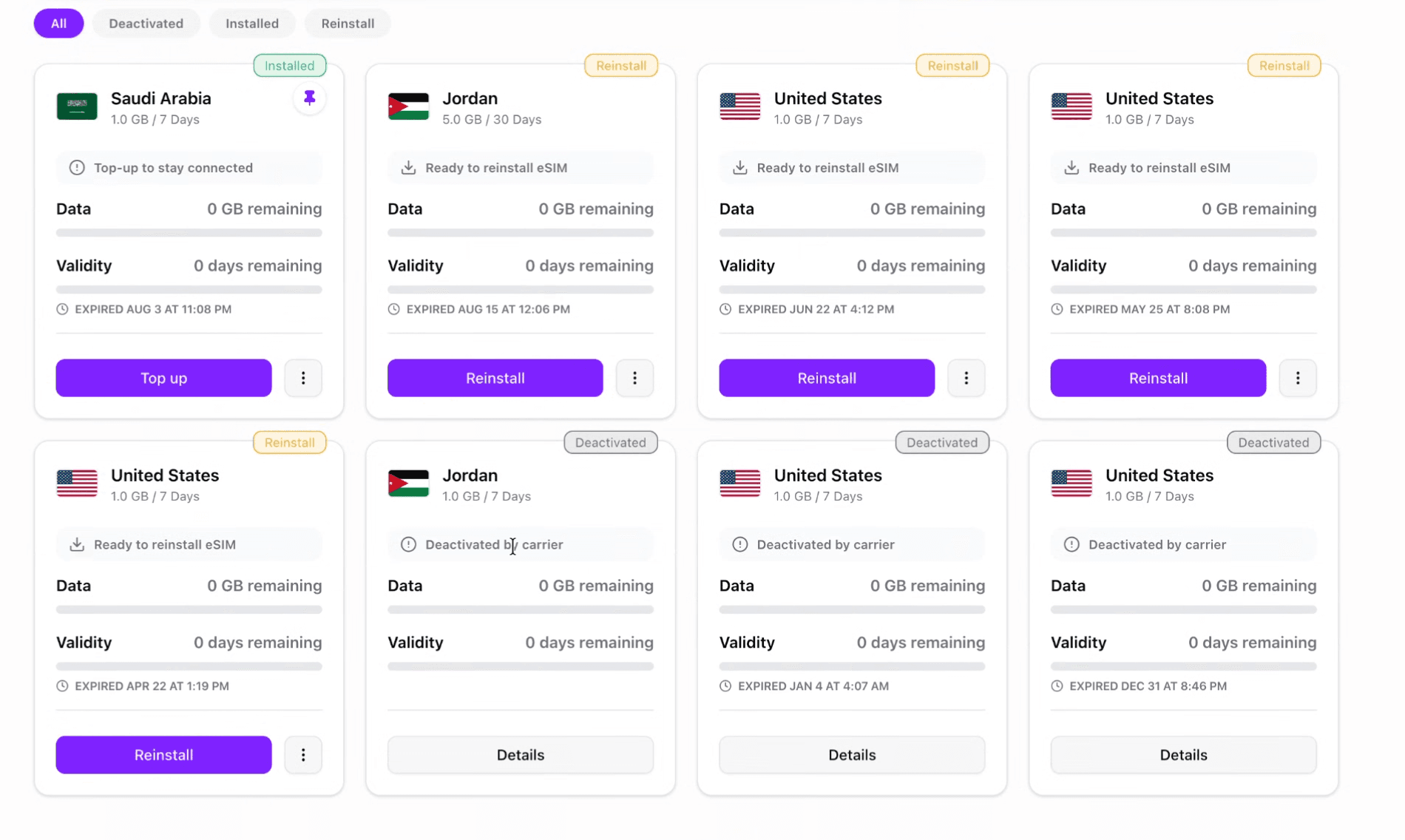
Sign in to your Figabytes account and go to:
Profile → My eSIMs
Each eSIM will display its current status at the top of the eSIM card.
You can also use the status filters to quickly find eSIMs that are:
Installed means the eSIM profile has been successfully installed on a device.
When an eSIM shows as Installed, Figabytes has received confirmation from the provider that the eSIM profile is currently installed.
You can continue to view important information such as:
If the eSIM is being actively used, you can also monitor its data consumption from your Figabytes account.
Reinstall means the eSIM is currently available to be installed again on a compatible device.
When you see this status, you'll also see the Reinstall button in your Figabytes account.
You can use it to access the eSIM installation details and install the eSIM again.
This can be useful if you want to reinstall the eSIM on your own device or share it with someone else.
Yes.
If your eSIM shows Reinstall, you can use the available installation details to install it on another compatible device.
For example, if you have an eligible unused eSIM and want a family member or friend to use it, you can share the installation details with them.
However, there are two important rules:
You cannot install the same eSIM simultaneously on multiple phones or devices.
Installing it on another person's device does not create another copy of the eSIM and does not transfer ownership of the eSIM to that person.
No.
A Figabytes eSIM cannot be installed and used on multiple devices at the same time.
One eSIM = one device at a time.
If you share an eSIM with someone and they successfully install it on their device, you cannot use that same eSIM simultaneously on another device.
If multiple people need mobile data, each person should have their own eligible eSIM.
Once the other person successfully installs the eSIM, its status in your Figabytes account may change from:
Reinstall → Installed
The eSIM is now installed on that person's device and cannot simultaneously be installed on another device.
However, the eSIM still belongs to your Figabytes account.
You remain the account owner and can continue monitoring the eSIM from My eSIMs.
Depending on the plan status, you may be able to see:
No.
Sharing the eSIM installation details does not transfer ownership of the eSIM or plan.
The eSIM remains associated with the Figabytes account that originally purchased it.
The person receiving the eSIM only installs and uses the eSIM on their device.
They don't become the owner of the eSIM or gain access to your Figabytes account.
Only share your eSIM installation details with someone you trust.
Once another person installs and starts using the eSIM, their mobile data usage will consume data from the bundle associated with your eSIM.
For example:
If your eSIM has 5 GB available and the person using it consumes 2 GB, approximately 3 GB will remain available on the plan.
You can monitor the remaining data from your Figabytes account.
Remember:
An eSIM shared with another person can only be installed on one device at a time.
Do not share the same installation details with multiple people expecting them to use the eSIM simultaneously.
No.
Reinstalling or sharing an eSIM does not give another person access to your Figabytes account.
Your account remains completely separate from the device where the eSIM is installed.
You should never share:
You only need to share the relevant eSIM installation details when appropriate.
Deactivated means the eSIM has been deactivated by the carrier or eSIM provider and can no longer be used.
You may see:
Deactivated by carrier
in your My eSIMs section.
This is different from an eSIM simply having no active data bundle.
An eSIM may be deactivated by the carrier when:
This is a carrier-level deactivation.
Once the provider reports the eSIM as deactivated, Figabytes displays the updated status in your account.
No.
If an eSIM has been deactivated by the carrier, it can no longer be reinstalled or used again.
Instead of a Reinstall option, you'll see the eSIM marked as Deactivated.
If you need connectivity again for that destination, you'll need to purchase a new eligible eSIM or plan.
No. These are different.
An expired bundle means the data package associated with the eSIM has reached the end of its validity or has no remaining data.
A deactivated eSIM means the underlying eSIM itself has been deactivated by the carrier.
An eSIM may therefore have an expired bundle without immediately being deactivated.
If the eSIM remains unused for approximately 6 months with no active bundle, the carrier may eventually deactivate it.
If you want to keep using an existing eSIM, don't assume it will remain available indefinitely without an active bundle.
An eSIM with no active bundle and no usage for approximately 6 months may be deactivated by the carrier.
Once deactivated, it can't be reinstalled.
Check My eSIMs to see the latest status reported by the provider.
| Status | What it means | What you can do |
|---|---|---|
| Installed | The eSIM is currently installed on a device | Use it and monitor its plan and data consumption |
| Reinstall | The eSIM is available to be installed again | Install it on one compatible device, including sharing it with someone you trust |
| Deactivated | The carrier has deactivated the eSIM | It can no longer be reinstalled or used |
Even when an eSIM shows Reinstall, this doesn't mean you can create multiple installations.
A single eSIM can only be installed on one device at a time.
If you want to provide connectivity to several travelers, each traveler will need their own eligible eSIM.
The Reinstall feature simply allows an eligible eSIM to be installed again or installed on another compatible device when its current status allows it.
The underlying eSIM status comes from the eSIM provider or carrier.
Figabytes displays this information in your account so you can easily understand the current state of each eSIM.
For example, when the provider confirms that an eSIM has been installed, becomes available for reinstallation, or has been deactivated, the corresponding status is reflected in My eSIMs.
To manage your eSIMs:
This makes it easier to manage multiple eSIMs from previous and upcoming trips.
If you're unsure why your eSIM shows Installed, Reinstall, or Deactivated, contact Figabytes Support.
Please provide:
Our support team can help you understand the current status of your eSIM.

