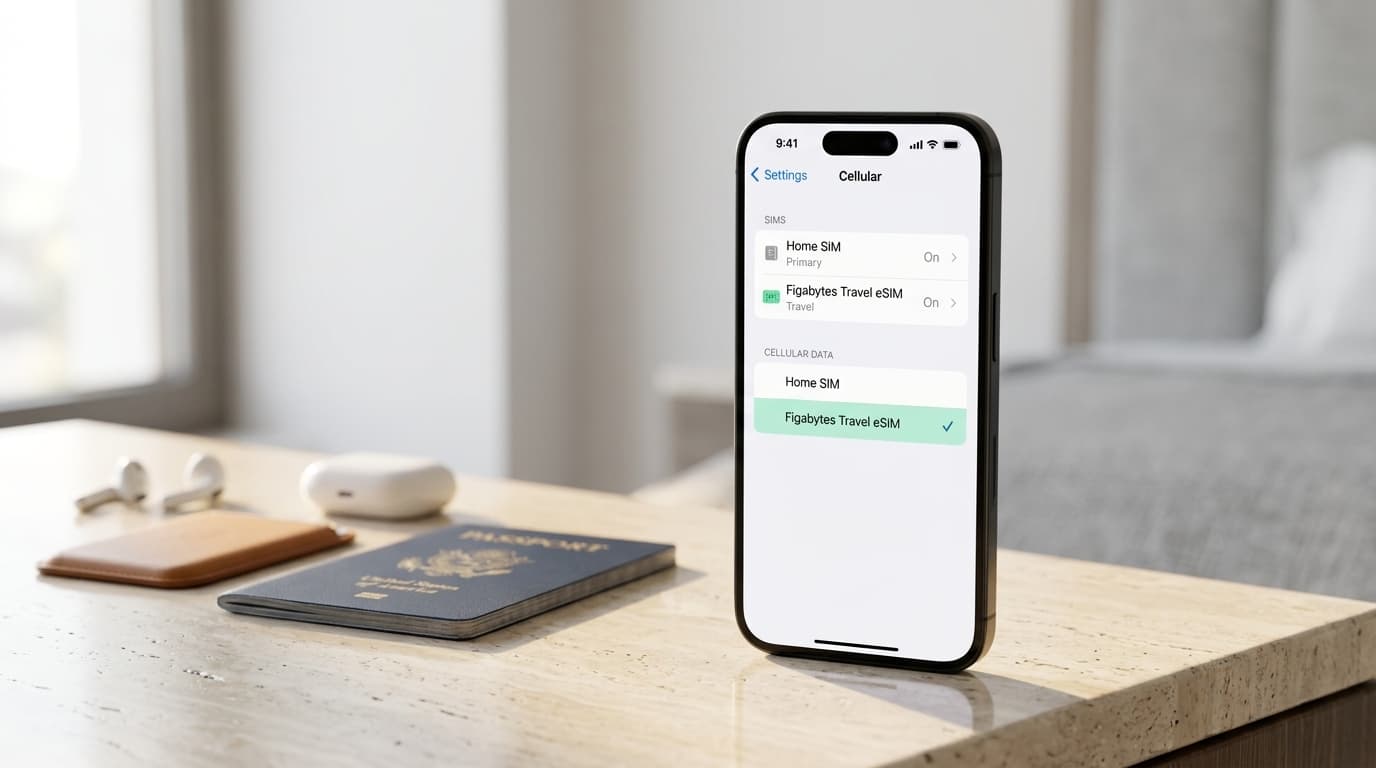
Traveling internationally doesn't have to mean choosing between staying reachable on your regular phone number and using mobile data at your destination.
With Dual SIM on a compatible iPhone, you can manage two mobile subscriptions on the same device.
For example, you can keep your home SIM available for calls and verification messages while using a Figabytes travel eSIM for internet access.
This is especially useful when traveling internationally because your regular phone number and travel data connection can serve different purposes.
However, using Dual SIM correctly requires a few important settings. Choosing the wrong mobile data line or leaving automatic switching enabled could result in unexpected home-carrier roaming usage.
This guide explains how Dual SIM works on iPhone, how to configure it for international travel, and how to avoid common mistakes.
To use Dual SIM on iPhone for international travel:
With this setup, your travel eSIM provides mobile data while your home SIM can remain available for supported calls and SMS.
Keeping your home SIM active does not automatically prevent roaming charges.
Dual SIM allows a compatible iPhone to use two mobile subscriptions on one device.
Each subscription can have its own phone number, carrier, and service conditions.
Depending on the iPhone model and region, Dual SIM may work through:
Some iPhones support only eSIM, while others support a combination of physical SIM and eSIM.
The important distinction is that Dual SIM allows you to manage two subscriptions without carrying two phones.
For international travel, this means your regular mobile line and your travel data plan can coexist on the same device.
Dual SIM on iPhone uses Dual SIM Dual Standby technology.
This allows two supported mobile subscriptions to remain available while the device is in standby.
However, both lines do not independently provide cellular data at the same time.
Your iPhone normally uses one selected subscription for cellular data.
For example:
| Function | Home SIM | Figabytes Travel eSIM |
|---|---|---|
| Regular phone number | Available | Usually data-only |
| Cellular data | Not selected | Selected |
| Incoming cellular calls | Subject to carrier support | Usually not included |
| SMS verification | Subject to carrier support | Usually not included |
| Internet-based messaging | Uses available internet connection | Provides mobile data |
| Data Roaming | Off | On if required |
The exact capabilities depend on your iPhone, mobile subscriptions, and carrier services.
An active cellular call on one line may also affect connectivity on the other line, depending on Wi-Fi Calling support and your device configuration.
Many modern iPhones support Dual SIM, but the available configuration varies by model and region.
Examples include:
Earlier supported models generally use a physical SIM and an eSIM.
iPhone 13 and later models support two active eSIMs in supported configurations.
Some regional models use different SIM arrangements, including models with two physical SIM slots or models without physical SIM trays.
Always check your exact model before purchasing a travel eSIM.
Open:
Settings > Cellular
Look for your available mobile subscriptions and the option to add an eSIM.
You can also visit:
Settings > General > About
Check for an EID and review the device's SIM information.
Open:
Settings > General > About
Find Carrier Lock.
If the status says "No SIM restrictions," your iPhone is generally unlocked.
A carrier-locked iPhone may not accept a travel eSIM from another provider.
Dual SIM offers several practical benefits.
You may be able to receive calls and verification messages on your home number while traveling.
This can be useful for banking, account access, and other services connected to your regular number.
A travel eSIM lets you use a separate subscription for mobile internet access.
This reduces your reliance on your home carrier's international data roaming service.
You don't need to remove your physical SIM when using a compatible travel eSIM.
Your iPhone provides settings for choosing which subscription handles cellular data and regular calls.
You can often install a travel eSIM before leaving home, subject to its activation conditions.
This gives you time to configure your phone before arriving at your destination.
Before starting, confirm that your iPhone supports eSIM, is unlocked, and has a reliable internet connection.
Purchase a travel eSIM plan covering your destination.
Follow the installation instructions supplied with your plan.
For QR code installation:
Other installation methods may be available depending on your plan.
Do not delete the installed eSIM unless necessary, because reinstallation is not guaranteed for every profile.
Clear labels make managing Dual SIM easier.
For example:
To change a label:
Your iPhone may ask which subscription you want to use for regular cellular calls.
If your Figabytes travel eSIM is data-only, your home SIM may remain the appropriate voice line.
However, regular calls through your home SIM can incur roaming charges abroad.
Review your carrier's international calling and roaming conditions.
Open:
Settings > Cellular > Cellular Data
Choose your Figabytes travel eSIM.
This tells your iPhone which subscription to use for mobile internet access.
In the Cellular Data settings, look for:
Allow Cellular Data Switching
Turn this option off if you want to prevent your iPhone from automatically using your home SIM for mobile data.
This is particularly important when your home carrier charges separately for international roaming.
Open the settings for each subscription.
For your home SIM:
For your Figabytes travel eSIM:
Many travel eSIMs use local partner networks and require the roaming setting to be enabled.
Follow your specific plan instructions.
Once you reach your destination:
Your travel eSIM should connect when its coverage, activation conditions, and network requirements are satisfied.
For travelers who want to keep their regular number while using separate mobile data, the following configuration is a useful starting point.
| iPhone Setting | Recommended Configuration |
|---|---|
| Home SIM | Enabled if needed for calls or SMS |
| Travel eSIM | Enabled |
| Cellular Data | Figabytes travel eSIM |
| Home SIM Data Roaming | Off |
| Travel eSIM Data Roaming | On if required |
| Allow Cellular Data Switching | Off |
| Default Voice Line | Based on calling needs |
| Network Selection | Automatic unless instructed otherwise |
These settings help control which line provides mobile data.
They do not guarantee that your home carrier will never charge for calls, SMS, voicemail, or other roaming services.
Yes, if your home carrier supports roaming and your iPhone is configured correctly.
Your home SIM can remain registered on a supported foreign network while your travel eSIM provides mobile data.
However, incoming calls may incur charges depending on your home carrier.
If you answer a regular cellular call, your phone's data behavior may also change temporarily.
On supported configurations, Wi-Fi Calling and cellular data switching can affect whether services on the other line remain available during a call.
If you want to avoid home-carrier voice roaming charges, consider disabling the home line or requesting a roaming block.
Often, yes.
Keeping your home SIM enabled may allow you to receive SMS verification codes from services associated with your regular number.
This can be useful for:
However, successful delivery depends on your home carrier's roaming arrangements and the service sending the message.
Some carriers allow incoming SMS without an additional charge, while others have different policies.
Do not assume that every SMS service is free or guaranteed to work internationally.
If verification codes are essential during your trip, check your home carrier's roaming support before departure.
Yes.
WhatsApp and other internet-based messaging applications generally use whichever internet connection is available on your iPhone.
If your Figabytes travel eSIM is selected for mobile data, supported messaging applications can use that connection.
Installing a travel eSIM does not normally change the phone number registered with your existing messaging account.
You can continue using your usual account without switching your registered number.
However, if an application requires a new SMS verification, you may need access to the registered phone number.
Not automatically.
Dual SIM allows you to separate your home mobile subscription from your travel data connection.
However, your home SIM can still incur roaming charges if it remains active and you use chargeable services.
Potential charges include:
Turning off Data Roaming on the home SIM helps prevent ordinary mobile data roaming through that line.
It does not necessarily block cellular calls or SMS.
For stronger protection, contact your home carrier about blocking international roaming or disable the home SIM while abroad.
If your home SIM is active and registered on a supported roaming network, incoming calls may reach your regular number.
You can choose whether to answer.
Depending on your carrier, receiving or answering calls may result in charges.
If you're already using the other line for a cellular call, the availability of your home line can depend on device and carrier features.
Dual SIM does not guarantee that both lines can handle separate cellular calls simultaneously.
No, not as two independent simultaneous cellular data connections.
Your iPhone normally uses one selected subscription for cellular data at a time.
You can choose which line provides mobile data in Cellular settings.
Some iPhones support automatic cellular data switching, but this switches the selected data subscription rather than combining both plans into one connection.
For international travel, disabling automatic switching can help prevent unwanted use of your home subscription.
Yes, on supported iPhone models.
iPhone 13 and later support two active eSIMs in supported configurations.
This can be useful if your home mobile subscription is already an eSIM.
For example:
You can configure the subscriptions similarly to a physical SIM and eSIM combination.
However, supported configurations vary by model and region.
Some iPhones can store several eSIM profiles but cannot keep every stored profile active simultaneously.
You can change which subscription handles cellular data through Settings.
To switch your data line:
You can also adjust your default voice line through the relevant Cellular settings.
When traveling, confirm that your selected data line matches the subscription you intend to use.
If you don't need calls or SMS through your regular number, you may prefer disabling your home SIM.
To do this:
Your travel eSIM can remain active for mobile data.
Disabling your home SIM prevents it from using cellular services while switched off.
However, you will not receive regular calls or SMS through that line until you enable it again.
Your home subscription itself remains active with your carrier unless separately canceled or suspended.
Dual SIM can be particularly useful when visiting several destinations.
You can keep your home subscription installed while using a regional or global travel eSIM.
Figabytes offers country, regional, and global plans for supported destinations.
Before traveling, review:
If your itinerary includes several countries, check whether one regional plan covers your entire route.
A regional eSIM only works in the destinations included in that specific plan.
Check that:
Open Cellular Data settings and select your travel eSIM.
Disable Allow Cellular Data Switching if you want to prevent automatic switching.
Check your destination coverage, network availability, and activation conditions.
If necessary, toggle Airplane Mode and wait for the device to register on a supported network.
Confirm that your home SIM is enabled and that your home carrier supports the required roaming services.
If the issue continues, contact your home carrier.
Many travel eSIMs are data-only and do not provide traditional cellular voice service.
Use a supported internet-based calling application or another calling subscription.
Check device compatibility, carrier lock status, and whether the activation details are valid.
Do not repeatedly delete or reinstall an eSIM without checking its installation conditions.
Each subscription has its own coverage and usage conditions.
Installing an eSIM does not always make it the active data subscription.
Your iPhone may switch to another data subscription under certain conditions.
Calls, SMS, and other services may still be chargeable.
Some eSIM profiles may support reuse with eligible future plans.
Deleting a profile unnecessarily may complicate future installation.
Physical SIM and eSIM capabilities differ by model and region.
Yes. Compatible iPhones can use two mobile subscriptions, allowing you to keep your home number while using a separate travel eSIM for mobile data.
Yes. Your home SIM can remain active for supported calls and SMS while your travel eSIM provides mobile data.
It may. Regular cellular calls, SMS, and other roaming services can generate charges depending on your carrier.
Select your travel eSIM if you want to use its data allowance rather than your home carrier's international data roaming service.
Turning it off is generally useful when you want strict control over which subscription provides mobile data abroad.
Often, yes, if your home SIM is active and your carrier supports roaming SMS delivery.
Yes, on supported models. iPhone 13 and later support two active eSIMs in supported configurations.
No. Your iPhone normally uses one selected cellular data subscription at a time.
Yes. Your existing messaging account can normally continue working through the travel eSIM's internet connection.
That depends on whether you need calls or SMS through your regular number. Disabling the home SIM offers stronger protection against chargeable cellular roaming activity but makes the line unavailable.
Dual SIM makes international travel more convenient by allowing you to manage your regular mobile number and travel data connection on one compatible iPhone.
The most important step is configuring each subscription correctly.
Keep your home SIM enabled only if you need its services, select your travel eSIM for cellular data, review Data Roaming settings, and disable automatic switching when you want greater control.
Remember that using a travel eSIM does not automatically prevent roaming charges from your home carrier.
With the right setup, Figabytes can provide a separate mobile data connection while your regular number remains available when needed.
Device features, carrier services, and roaming conditions vary by model, region, and subscription.

