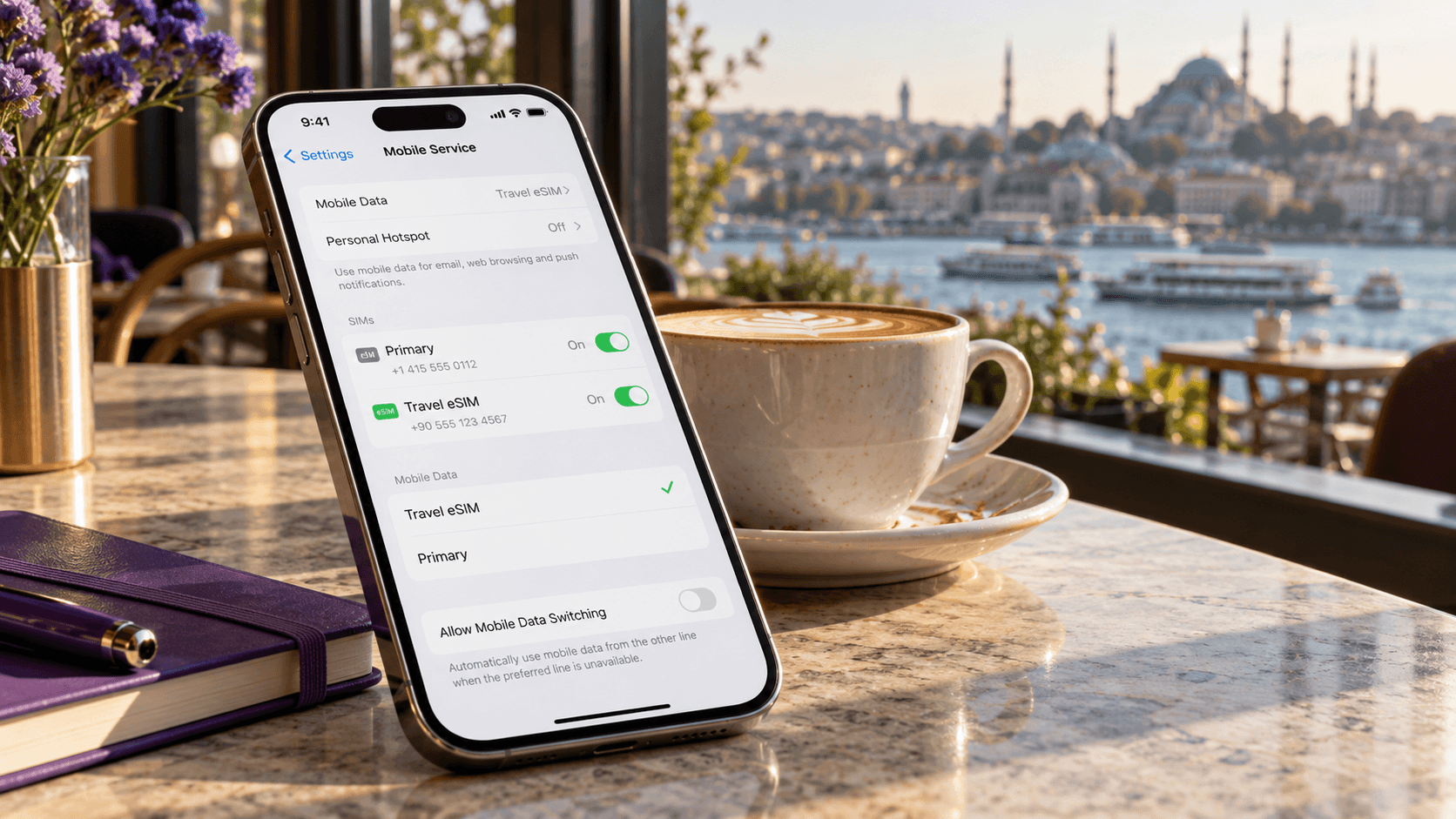
You're preparing for an international trip and considering a travel eSIM.
But there's one question you need answered before installing it:
What happens to your regular SIM card?
Will your existing number stop working? Do you need to remove your physical SIM? And can you still receive banking verification codes while using mobile data from a travel eSIM?
The good news is that many modern smartphones allow you to use an eSIM and a physical SIM at the same time.
This feature is called Dual SIM.
It allows you to keep your regular mobile subscription available while using another SIM for mobile data, calls, or other supported services.
For international travelers, one of the most practical setups is keeping a home SIM for calls and SMS while using a travel eSIM for internet access.
Here's how it works, how to configure it, and what to check before traveling.
Yes. On compatible Dual SIM smartphones, you can use a physical SIM and an eSIM at the same time.
For example, you can keep your regular physical SIM active for calls and SMS while using a Figabytes travel eSIM for mobile data abroad.
You generally do not need to remove your physical SIM to install a travel eSIM.
However, the exact combination of active SIMs depends on your device model, regional hardware configuration, carrier restrictions, and software.
A typical travel configuration looks like this:
| Function | Physical SIM | Travel eSIM |
|---|---|---|
| Regular phone number | Yes | Usually not needed |
| Voice calls | Through home carrier | Depends on plan |
| SMS and verification codes | Through home carrier | Depends on plan |
| Mobile internet | Not selected | Selected |
| Data Roaming | OFF | ON when required |
| WhatsApp and internet apps | Use the selected data connection | Provide mobile data |
| International roaming charges | May apply to calls or SMS | Governed by travel plan |
This setup can help you stay connected without relying on your home carrier's standard international data roaming rates.
Dual SIM is a smartphone feature that allows a device to manage two mobile subscriptions.
Depending on the phone, Dual SIM may support:
Some phones can also store multiple eSIM profiles, even though only a limited number can be active simultaneously.
Dual SIM is useful for people who want separate personal and work numbers, different mobile providers, or a dedicated travel data plan.
Each SIM represents a separate mobile subscription.
Your phone can identify the two lines independently and allow you to assign different functions to each one.
For example:
SIM 1: Your regular mobile number.
SIM 2: Your international travel eSIM.
You can choose which SIM handles mobile data and which line is preferred for outgoing calls.
On supported devices, both lines may remain available for incoming communications while one provides mobile data.
However, most Dual SIM smartphones do not provide two completely independent simultaneous cellular connections for every function.
Capabilities vary by device and network.
For example, taking a call on one line may affect data or call availability on the other line.
Using both SIMs allows you to separate your regular mobile number from your travel internet connection.
This can be useful for several reasons.
Your home SIM can remain installed and active.
You may continue receiving calls and SMS messages sent to your usual number, depending on your carrier's international roaming support.
This is particularly useful if your regular number is connected to banking, work, or personal accounts.
Instead of using your home carrier's standard international data roaming, you can select a travel eSIM for mobile internet.
For example, you could use a Figabytes eSIM for navigation, messaging, browsing, and other travel apps.
With a compatible phone, you don't need to remove your regular SIM card.
This eliminates the inconvenience of handling a small SIM card while traveling.
Dual SIM can help you maintain separate subscriptions for work and personal use.
You can assign a preferred line for calls and another for mobile data.
Many travel eSIMs can be installed before traveling.
This allows you to complete setup while you have reliable Wi-Fi.
However, check your plan's activation rules before installing it.
Many iPhones support Dual SIM functionality.
Depending on the model and market, this may involve a physical SIM and an eSIM or two active eSIMs.
Some iPhone models sold in certain regions do not include a physical SIM tray.
If your iPhone is eSIM-only, you cannot use a physical SIM in that device.
If your iPhone supports a physical SIM, leave your regular SIM card in the device.
You do not need to remove it to add a travel eSIM.
Open:
Settings > Cellular > Add eSIM
Depending on your region, Cellular may be called Mobile Data or Mobile Service.
Follow the installation instructions supplied by your eSIM provider.
You may be able to use a QR code, manual activation details, or another supported installation method.
After installation, your iPhone may ask you to label the lines.
For example:
Clear labels make it easier to avoid selecting the wrong line.
Select your preferred line for outgoing calls.
If you want to continue using your regular phone number, you can generally keep your home SIM as the default voice line.
Remember that international calling charges may apply.
Go to:
Settings > Cellular > Cellular Data
Choose your Figabytes eSIM.
This tells your iPhone which line to use for mobile internet.
Open the Figabytes line settings.
Enable Data Roaming when required by the travel eSIM.
Many travel eSIMs connect through roaming arrangements with supported local networks.
Open your home SIM settings separately.
Keep Data Roaming OFF if you want to avoid using your home carrier's international roaming data.
Under Cellular Data settings, review Allow Cellular Data Switching.
If you want strict control over which SIM provides mobile data, keep this option OFF.
Your iPhone should now be configured to use Figabytes for mobile internet while retaining your home SIM for supported calls and SMS.
Many Samsung Galaxy smartphones support Dual SIM functionality.
However, eSIM availability depends on the model, region, carrier, and software version.
Open:
Settings > Connections > SIM Manager
Look for an option to add an eSIM.
If the option is unavailable, check your exact device specifications.
Follow the provider's installation instructions.
You may be able to scan a QR code or enter activation details manually.
Open SIM Manager.
Confirm that your physical SIM and travel eSIM are enabled.
Choose Figabytes as your preferred mobile data line.
Select your preferred SIM for outgoing calls and messages where your device provides these options.
Go to:
Settings > Connections > Mobile Networks
Enable Data Roaming when required for your selected travel eSIM.
On some Samsung devices, roaming controls may not appear separately for every SIM.
Make sure Figabytes is selected for mobile data and review the device's behavior before enabling roaming.
After arriving at your destination, disable Wi-Fi temporarily and open a website.
This confirms whether your mobile data connection is working.
Many Google Pixel smartphones support eSIM and Dual SIM.
The supported combinations depend on the model.
Some Pixel devices can use a physical SIM and an eSIM, while newer supported models can use two active eSIMs.
Go to:
Settings > Network & internet > SIMs
Choose the option to add or download an eSIM.
Follow the provider's instructions.
Confirm that your regular SIM and travel eSIM are enabled.
Select Figabytes for mobile data.
Choose your preferred SIM for calls and text messages.
Open the Figabytes SIM settings.
Enable Roaming where required.
Keep home-carrier data roaming disabled if you want to avoid international roaming data charges.
Menu names may vary depending on the Android version and device.
For a typical trip, the following configuration offers a practical balance between connectivity and control.
| Setting | Home SIM | Figabytes eSIM |
|---|---|---|
| SIM enabled | Yes, if needed | Yes |
| Mobile data | No | Yes |
| Data Roaming | OFF | ON |
| Default voice line | Home SIM | Optional |
| SMS | Home SIM | Plan-dependent |
| Automatic data switching | Disabled | Disabled |
| Purpose | Regular number | Travel internet |
This setup helps prevent accidental use of home-carrier roaming data.
However, it does not eliminate every possible roaming charge.
Your home carrier may still charge for calls, SMS, or other services.
If avoiding all home-carrier roaming charges is your priority, consider disabling the home SIM entirely and using internet-based communications through your travel eSIM.
Often, yes.
On compatible Dual SIM phones, your physical SIM may remain available for incoming calls while your travel eSIM provides mobile data.
However, this depends on your device, carrier, network, and current activity.
For example, an incoming call on one SIM may interrupt mobile data or affect the availability of the other line on some devices.
Also, receiving or making calls while abroad may trigger international roaming charges.
Check your home carrier's rates before traveling.
Often, yes.
If your home SIM remains enabled and registers with a supported network abroad, it may continue receiving SMS messages.
This can be useful for:
For example, your bank may send an SMS to your regular phone number while your banking application uses Figabytes mobile data.
However, receiving SMS abroad depends on your carrier and destination.
Do not assume all SMS services are free.
Also, some banks and services may restrict verification methods or require additional security checks while you're abroad.
Yes, in normal circumstances.
WhatsApp is linked to your registered phone number, but it uses an internet connection for messaging and calls.
Installing a travel eSIM does not automatically change your WhatsApp account number.
You can continue using your existing WhatsApp account while your phone accesses the internet through Figabytes.
For example:
Your WhatsApp number remains your regular UAE number.
Your mobile internet comes from a Figabytes travel eSIM in Turkey.
Your contacts can continue messaging your existing WhatsApp account.
You generally do not need to change your WhatsApp number.
Yes, on supported smartphones.
Some newer devices allow two eSIM profiles to remain active simultaneously.
This can be useful for users with eSIM-only smartphones.
For example, you might have:
The configuration is similar to using a physical SIM and an eSIM.
However, the number of supported active eSIMs varies by device.
Some smartphones can store several eSIM profiles but activate only a limited number at once.
Yes, provided your device supports the configuration and is not restricted by a carrier lock.
For example, you may use your home mobile carrier on the physical SIM and Figabytes on the eSIM.
The two subscriptions do not need to come from the same provider.
However, a carrier-locked phone may prevent you from activating a second provider's SIM.
Always confirm your phone is unlocked before purchasing a travel eSIM.
Most Dual SIM smartphones allow you to choose one preferred line for mobile data at a time.
Some devices can switch between lines automatically under certain conditions.
However, this does not mean both SIMs normally combine their mobile data speeds.
For example, selecting Figabytes as your mobile data line means your phone will generally use that subscription for internet access.
Your home SIM may remain available for calls and SMS.
If automatic data switching is enabled, the device may use the other subscription under certain conditions.
For international travel, disabling automatic switching can help you maintain better control over data usage.
Using two active mobile subscriptions can increase battery consumption in some circumstances.
Your phone may need to maintain network registration for both lines.
Battery impact depends on factors such as:
For example, poor signal on one line may cause the phone to spend more energy searching for service.
However, using an eSIM instead of a physical SIM does not inherently cause significantly higher battery consumption.
If you don't need your home SIM during a trip, disabling it may help reduce unnecessary network activity.
Yes, if your phone supports the combination.
You can generally install a travel eSIM while keeping your regular physical SIM inside the phone.
This is one of the main conveniences of travel eSIM technology.
You don't need to remove your home SIM, store it separately, or risk losing it during your trip.
No, not automatically.
Installing an eSIM adds another mobile subscription to your device.
Whether both lines remain active depends on your phone's Dual SIM capabilities and settings.
Some devices may ask you to choose which lines to activate.
Others may require you to disable one profile before enabling another.
Review the available SIM settings after installation.
When your trip ends, you can switch mobile data back to your regular SIM.
A typical process is:
You do not necessarily need to delete the travel eSIM immediately.
Some eSIM profiles may remain stored on your device.
However, retaining a profile does not automatically extend its validity or preserve unused data beyond the plan's expiration.
It depends on the provider.
Some eSIM profiles can be transferred or reinstalled, while others are restricted to their original installation.
Figabytes supports reinstallation for eligible eSIMs.
For eligible profiles, the reinstallation process can allow the eSIM to be installed on another compatible device.
However:
Do not delete an eSIM or attempt to reuse its original QR code without checking the applicable rules.
If your Dual SIM setup isn't working correctly, identify the exact problem before changing multiple settings.
Possible causes:
Check device compatibility and installation status.
Possible causes:
Confirm your plan covers the destination and that the eSIM is enabled.
Check:
If necessary, briefly toggle Airplane Mode and test again.
Your phone may still have the home SIM selected as the preferred data line.
Open mobile data settings and select Figabytes.
Disable automatic cellular data switching if you want strict control.
Check whether:
If your home SIM has no service, it may not receive SMS verification codes.
Some Dual SIM configurations cannot maintain every voice and data connection simultaneously.
This depends on the device, carrier, and network technology.
Review your device's Dual SIM capabilities and preferred data settings.
If you're using a regional or global plan, confirm the new destination is included.
Then check network registration, Data Roaming, plan validity, and supported networks.
Check whether your device supports two active subscriptions in the selected configuration.
Some models support multiple stored eSIM profiles but fewer simultaneously active lines.
Also confirm that the device is carrier-unlocked.
Most phones use one selected mobile data line at a time.
Check which SIM is providing your internet connection.
Your travel eSIM may require Data Roaming.
Your home SIM may incur international roaming charges if its data roaming is enabled.
Configure the lines separately.
Turning off Data Roaming does not necessarily prevent calls or SMS from using international roaming.
Some eSIM profiles cannot be reinstalled using the original credentials.
Contact your provider before deleting a profile.
Dual SIM functionality varies by model, region, and carrier.
Verify the exact device configuration.
Yes. Many modern smartphones support using one physical SIM and one eSIM simultaneously.
No, not on compatible Dual SIM devices.
Yes. This is a common international travel setup.
Often, yes. Availability depends on your device, carrier, and network conditions.
Often, yes, if your home SIM remains active and can receive SMS abroad.
No. Installing an eSIM does not automatically change your registered WhatsApp number.
Yes, provided the phone supports the configuration and is carrier-unlocked.
Most Dual SIM phones use one preferred data line at a time, although some support automatic switching.
Yes, on supported devices.
It can increase battery consumption in some circumstances, particularly when both lines maintain network connections.
Usually not for a typical travel setup. Enable it for the travel eSIM when required and keep it disabled for the home SIM if avoiding home-carrier roaming data.
Not necessarily. Carrier locks can prevent using another provider's eSIM.
Yes. Your home SIM can remain associated with your regular number.
Yes. Compatible devices allow you to change preferred lines for mobile data and other supported services.
Not always. Installation and activation are separate processes, and validity rules depend on the plan.
You can select your home SIM for mobile data again and disable the travel eSIM if it is no longer needed.
You don't have to choose between keeping your regular SIM and using a travel eSIM.
On compatible Dual SIM smartphones, both can work together.
Your physical SIM can remain available for your regular phone number, calls, and SMS.
Your Figabytes travel eSIM can provide mobile data through supported networks at your destination.
For a typical international travel setup:
Before traveling, confirm your device supports Dual SIM, your phone is carrier-unlocked, and your eSIM plan includes the destination.

